Can Foreigners Use WeChat Pay?
The 2026 Guide
TL;DR — The Short Version
- Yes, foreigners can use WeChat Pay — Visa, Mastercard, and JCB are directly supported (as of our latest check). Amex is spotty — prefer Visa/MC if you have both
- No Chinese bank account needed. Overseas phone numbers usually work, but SMS delivery and risk-control checks can vary by country and carrier
- Setup takes about 10–15 minutes — passport scan + selfie + SMS code
- But: WeChat Pay is fussier than Alipay. Use Alipay as your main payment app, WeChat as backup
- You'll want WeChat Pay for small family-run shops and mini-program ordering (Starbucks, Luckin, KFC)
Why Bother With WeChat Pay If Alipay Works?
Fair question. I've lived in Hangzhou for years, and here's the honest truth: for 90% of tourist purchases, Alipay alone is enough. Convenience stores, restaurants, Didi rides, metro — Alipay handles all of them, and its English UI is better.
But there are moments when only WeChat Pay will save you. I learned this the hard way at a noodle shop near West Lake — a tiny family-run place with six tables, handwritten menu, and the best 片儿川 (piàn'ér chuān) noodles I've ever had. When I pulled out my phone to pay, the owner pointed at a faded WeChat QR sticker taped to the wall. No Alipay. Just WeChat. I had to call a Chinese friend to come pay for me. The noodles were ¥18 — about $2.50 — but I couldn't pay for them because I'd never bothered to set up WeChat Pay.
Here's when WeChat Pay becomes essential:
- Small family-run shops and street food stalls — many owners only use WeChat for everything. It's their messaging app, their social network, and their payment tool all in one. They never installed Alipay because WeChat already does everything.
- Mini-program ordering — Starbucks, Luckin Coffee, KFC, and many chain stores have in-WeChat mini-programs for mobile ordering. Scan a QR code at the table, order in the mini-program, pay with WeChat Pay. No app download, no queue.
- A note on receiving money: Peer-to-peer transfers and red packets (红包) usually require a mainland bank-card setup and may not work for visitors using only an overseas card. WeChat Pay is best treated as a payment tool for merchants, not a money-transfer app for travelers.
WeChat Pay vs Alipay — Quick Comparison
| What matters | Alipay | WeChat Pay |
|---|---|---|
| Foreign card support | ✓ Since 2023 | ✓ Since Nov 2024 |
| English UI quality | Excellent | Good (redesigned 2024) |
| Setup time | ~5 min | ~10–15 min |
| Risk-control triggers | Rare | Common — accounts get flagged often |
| Single-transaction limit | ~¥5,000 | ~¥6,500 |
| Transaction fee | ~0% small; ~3% large* | ~0% small; ~3% large* |
| *Fees vary by card issuer, currency, and platform policy. Check payment screen before confirming. | ||
| Small shops / street food | Most accept | Near-universal |
| Receiving money from locals | Limited | Not recommended — usually unavailable with overseas-card-only setup |
Step 1: Navigate to Your Wallet
Before you start: do this setup before you fly. WeChat's SMS verification and server connections can be unreliable from outside China, so give yourself a few days of buffer. Do it on home WiFi, not at the airport.
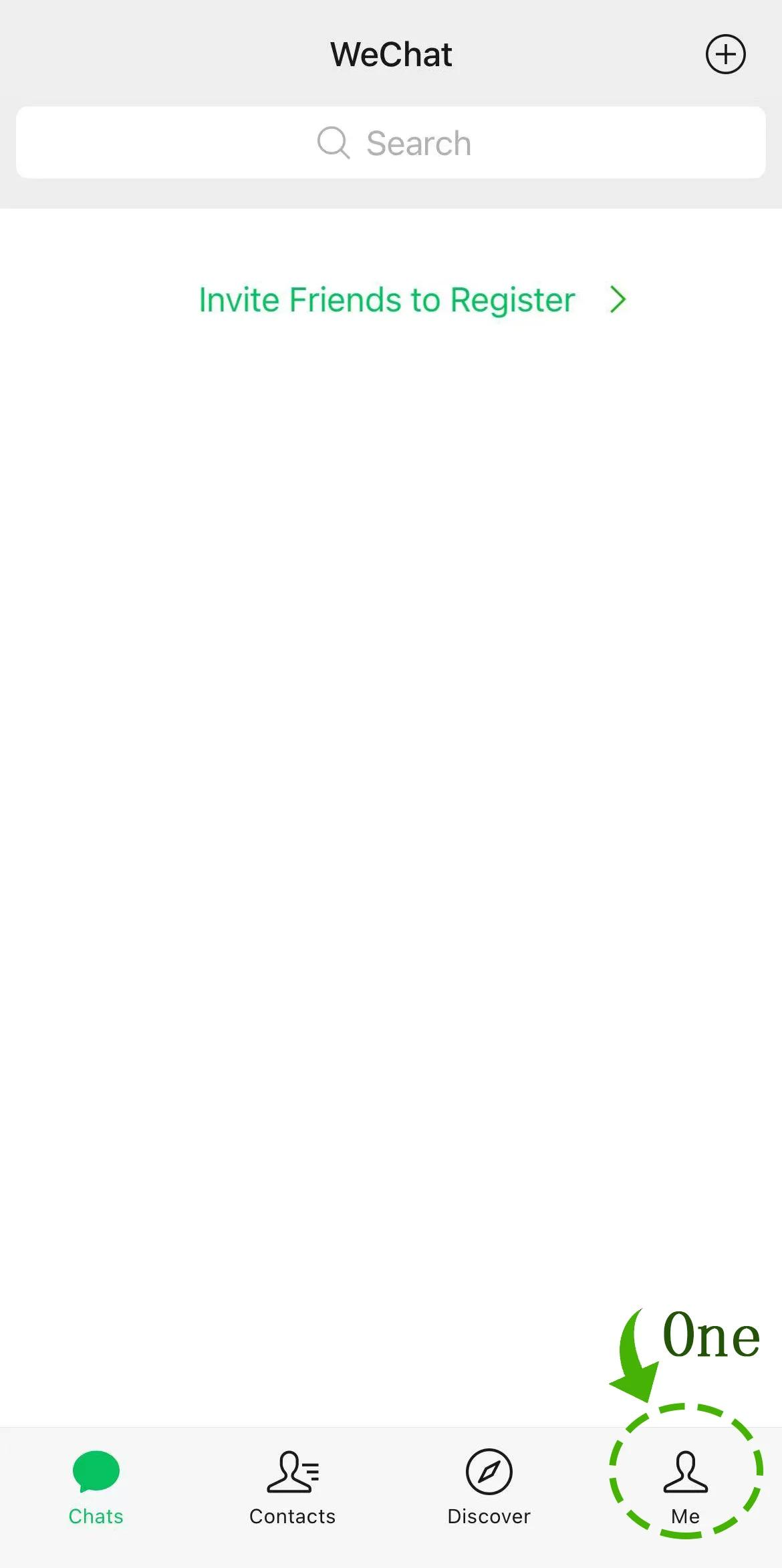
1.1 Open the "Me" Tab
Tap the Me icon at the far right of WeChat's bottom navigation bar. This opens your personal homepage.
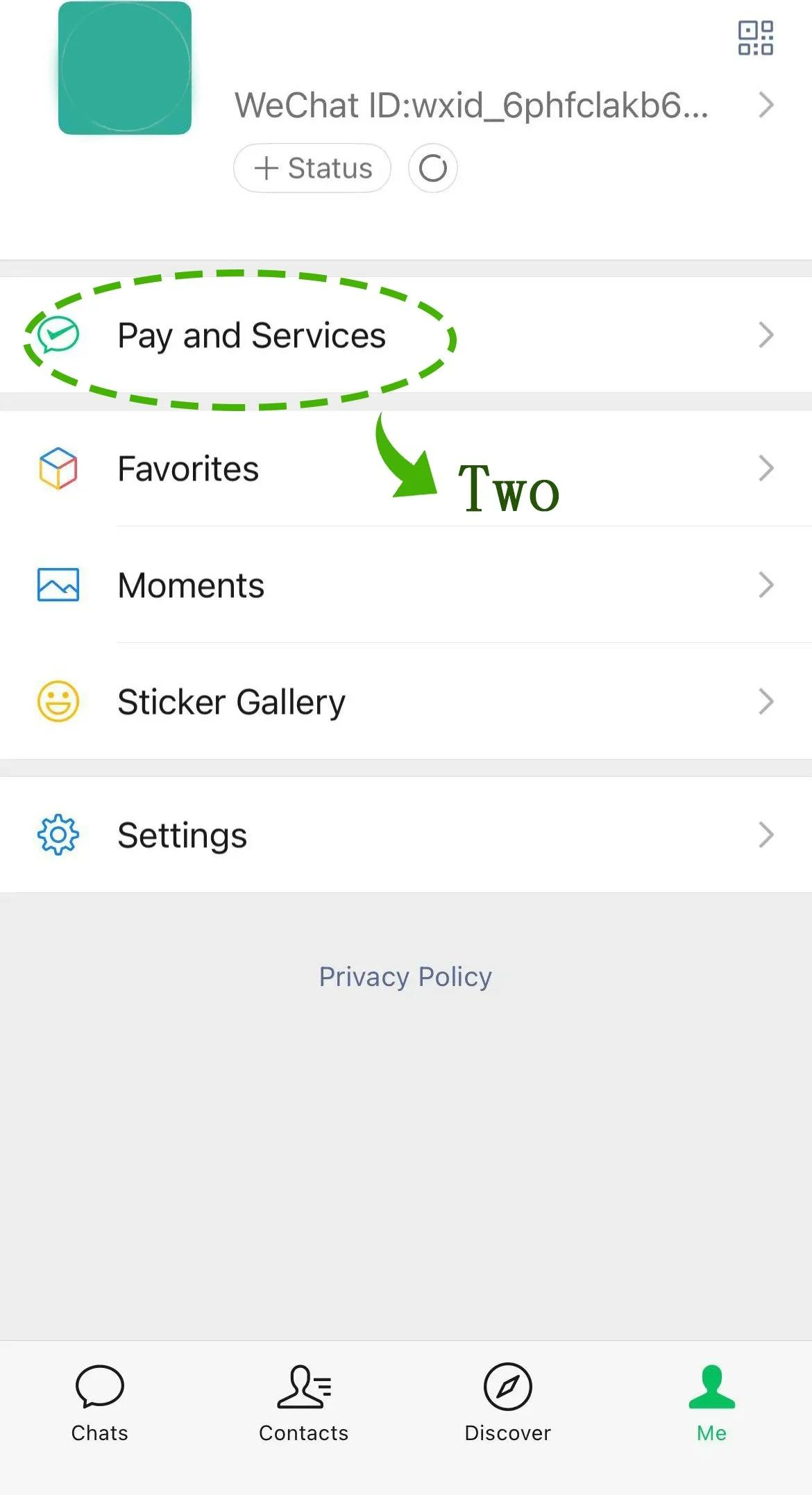
1.2 Open "Pay and Services"
On the Me page, find and tap Pay and Services — the option with a green wallet-style icon.
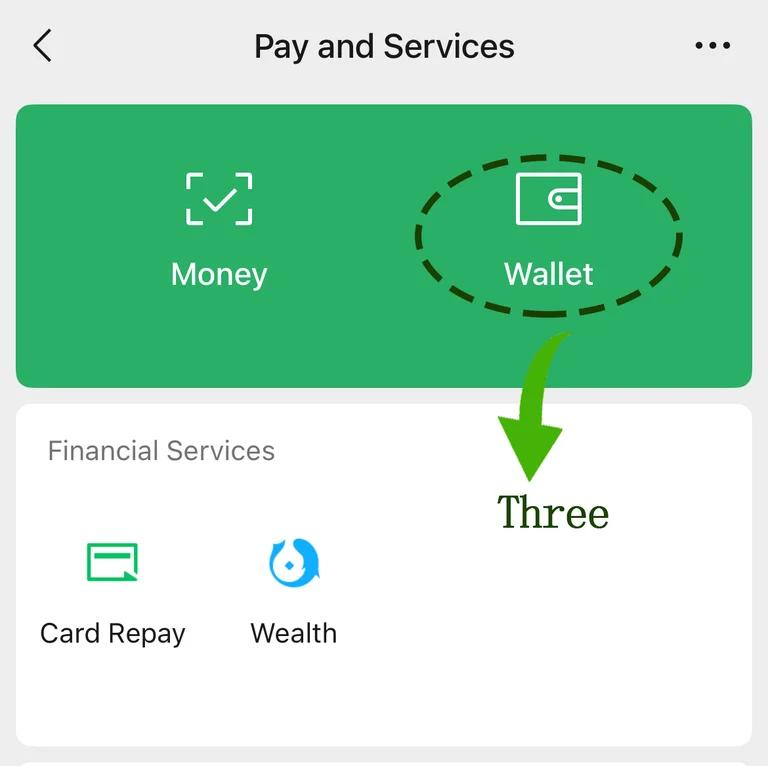
1.3 Enter the Wallet
After entering the Pay and Services page, tap the top module labeled Wallet.
Step 2: Identity Verification (Passport)
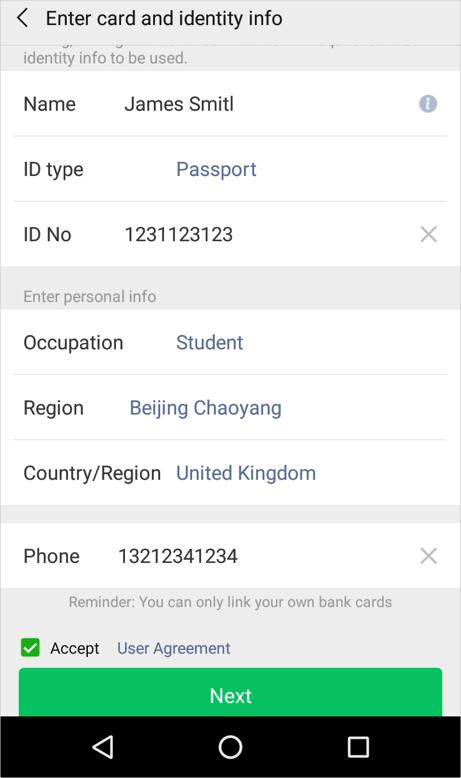
This is the step most first-timers get wrong — or skip entirely, then wonder why their payments fail. WeChat requires real-name verification before you can add a foreign card and pay. Here's exactly what to do:
- Inside Wallet, tap Identity Verification → Verify Now
- Document type: select Foreign Passport
- Fill in your details exactly as they appear on your passport:
- Full name (match the MRZ — the machine-readable zone at the bottom of your passport page)
- Passport number
- Nationality
- Date of birth
- Take a clear photo of your passport information page. No glare on the laminate, full page visible, good lighting. If the text is blurry, it'll be rejected
- Complete facial verification — the app will ask you to blink, turn your head, or read a number. Do this in natural light, not under harsh ceiling lights
- Wait for approval — usually instant, occasionally a few minutes, rarely up to 24 hours
Step 3: Add Your International Card
Once identity verification passes, you're ready to link your card.
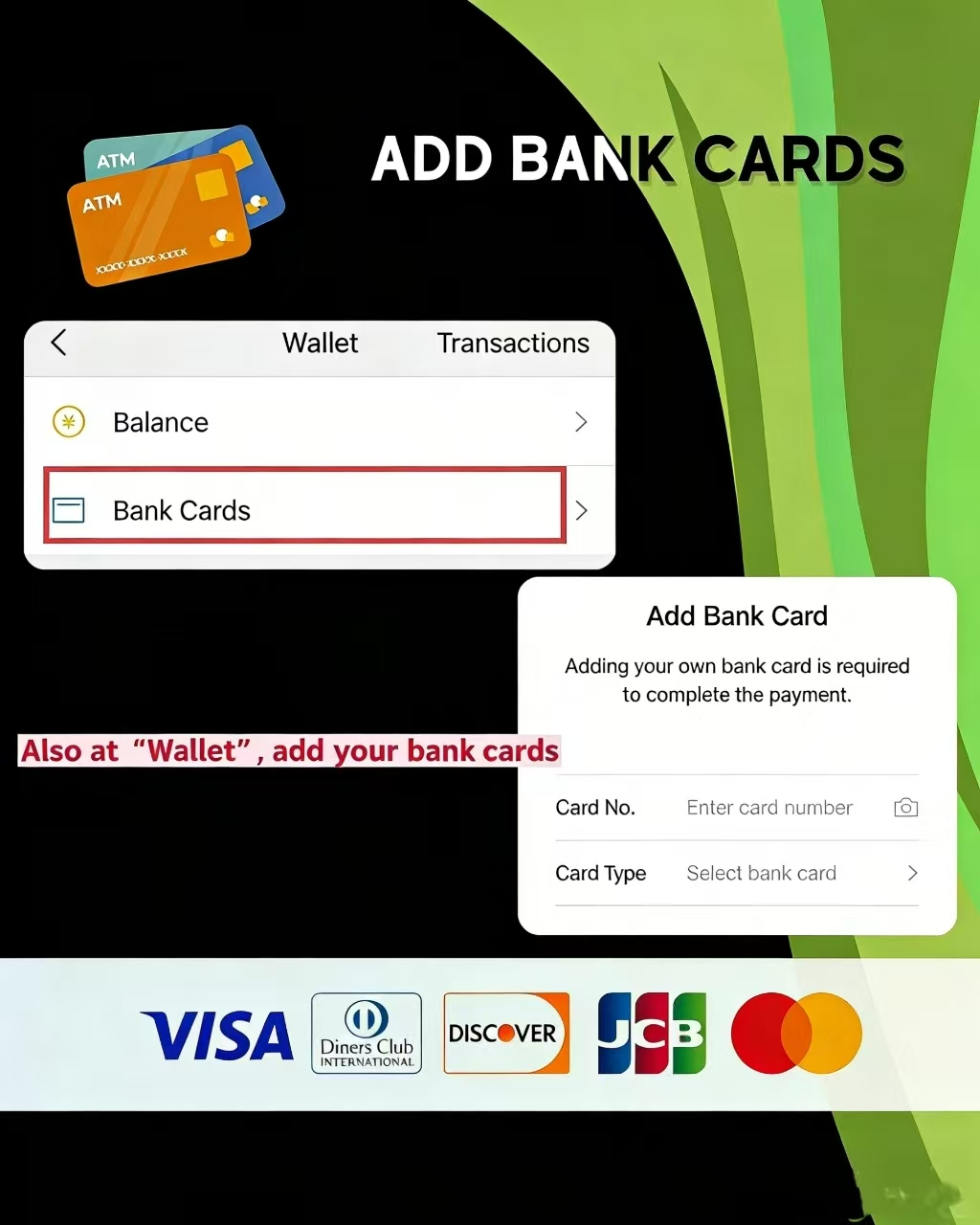
- Go to Wallet → Bank Cards → Add a Bank Card
- Enter your 16-digit card number (you can scan it with your camera or type it manually)
- Enter the expiry date (MM/YY) and CVV (3 digits on the back)
- Cardholder name: enter it exactly as it appears on the card and in your passport. This is the most common rejection point
- Billing address: use the address registered with your bank — not your hotel in China, not a friend's address. Your bank will verify this
- Phone number: enter your overseas number. WeChat sends an SMS verification code to this number — make sure you can receive international SMS
- Create a 6-digit payment PIN. This is separate from your bank PIN. Pick something you'll remember — you'll type it every time you pay
How to Actually Pay (Once You're in China)
After you land, paying with WeChat is easy. There are two ways — and once you've done each one time, it becomes muscle memory.
Method A: You Scan Their Code
This is what you'll use at most shops, restaurants, and street vendors. The merchant shows you a QR code — usually on a small laminated sign or displayed on a screen. But here's something nobody tells you: there are three types of merchant QR codes, and knowing which is which saves you from awkwardly holding up the line.
① Blue Alipay code. This is for Alipay — don't scan it with WeChat.
② Green WeChat Pay code. Scan this with WeChat.
The image below shows both side by side for comparison:
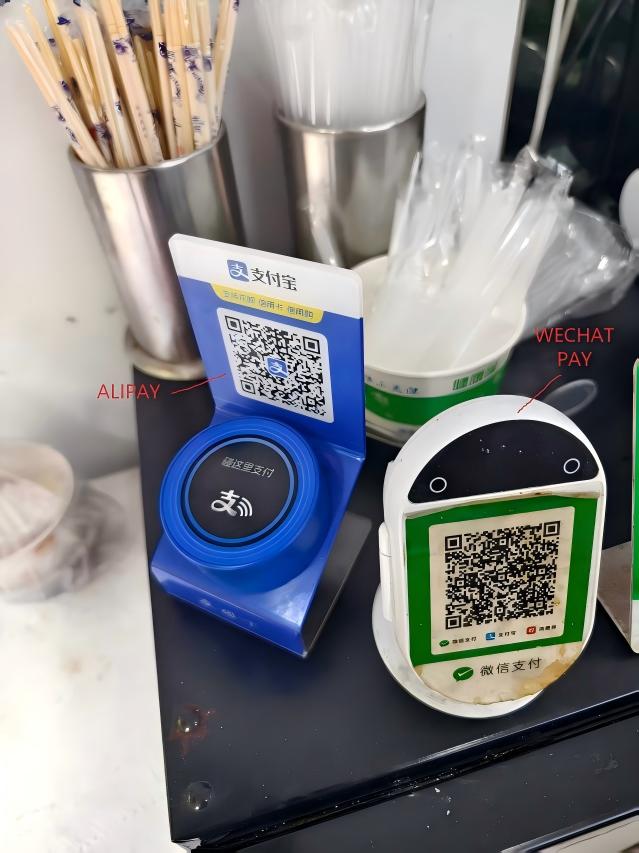
← Alipay (blue, left) | WeChat Pay (green, right) →
③ Combined code — works with both, scan with either app.
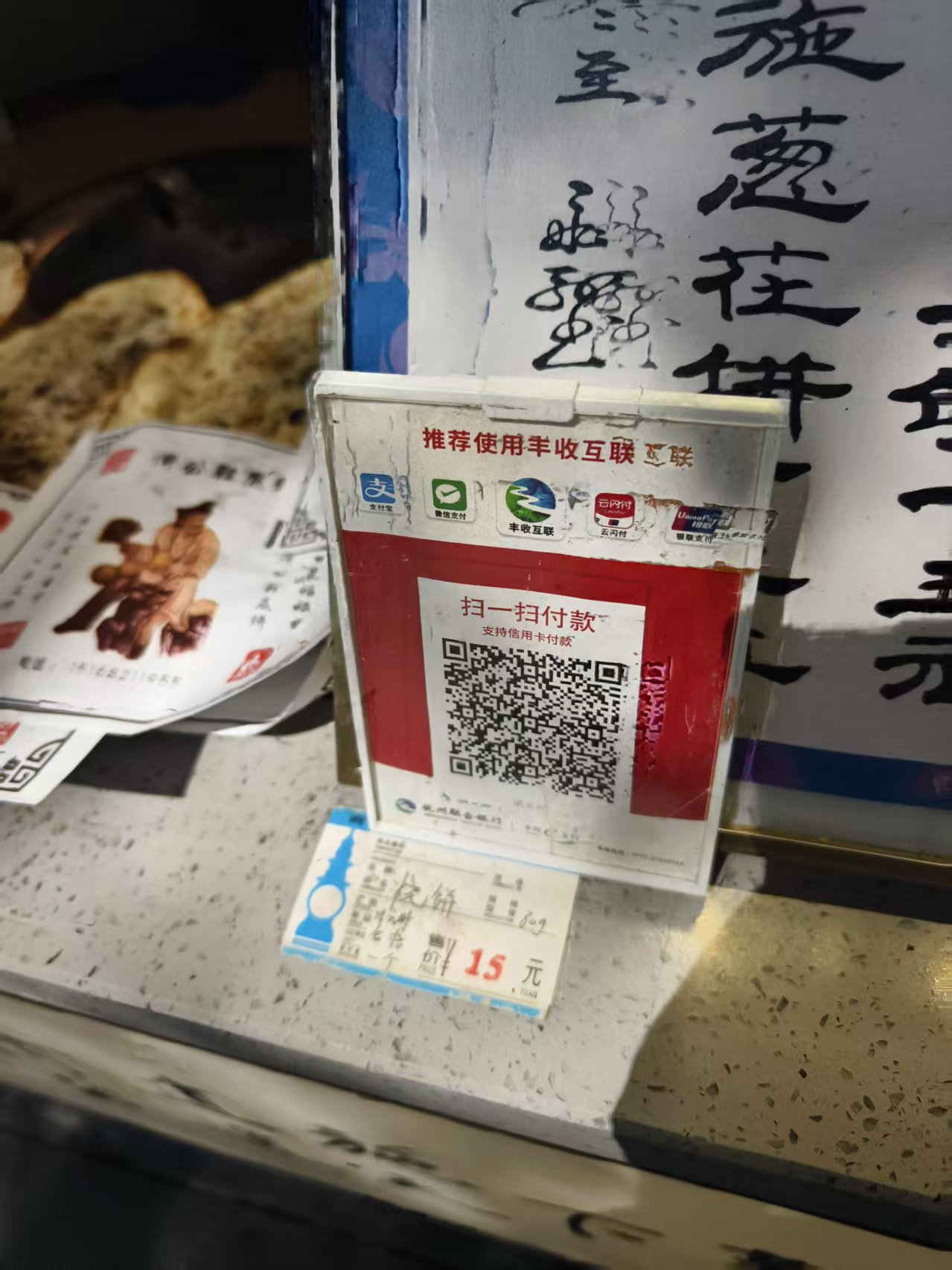
Bottom line: if it's not blue, you're good. Green or combined, WeChat handles it.
Now, open WeChat. On the home screen, tap the + button in the top-right corner. A menu slides up — tap Scan.
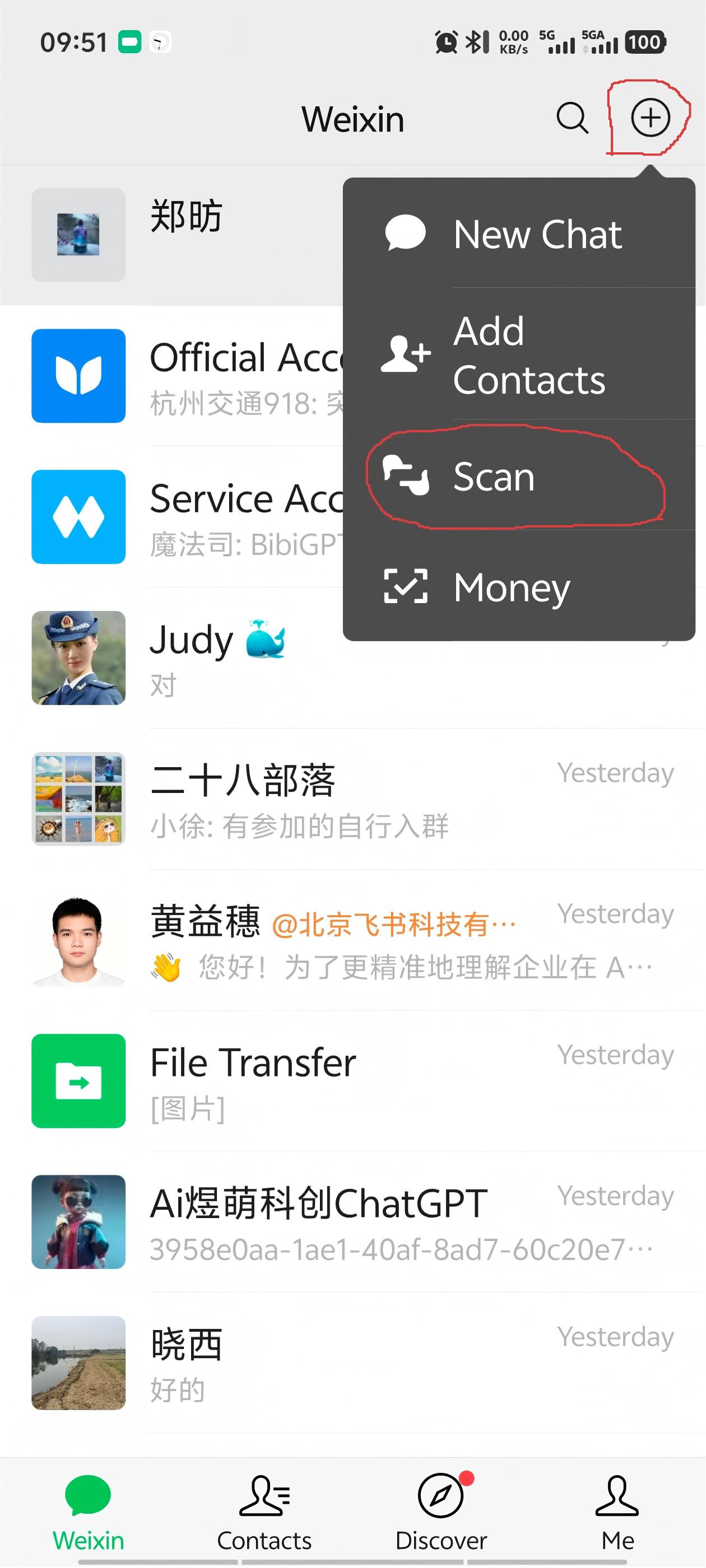
Point your camera at the QR code. WeChat reads it, then asks you to enter the amount — the cashier will tell you how much (they'll usually show you the number on a calculator or write it down). Type it in, double-check, then tap Pay.
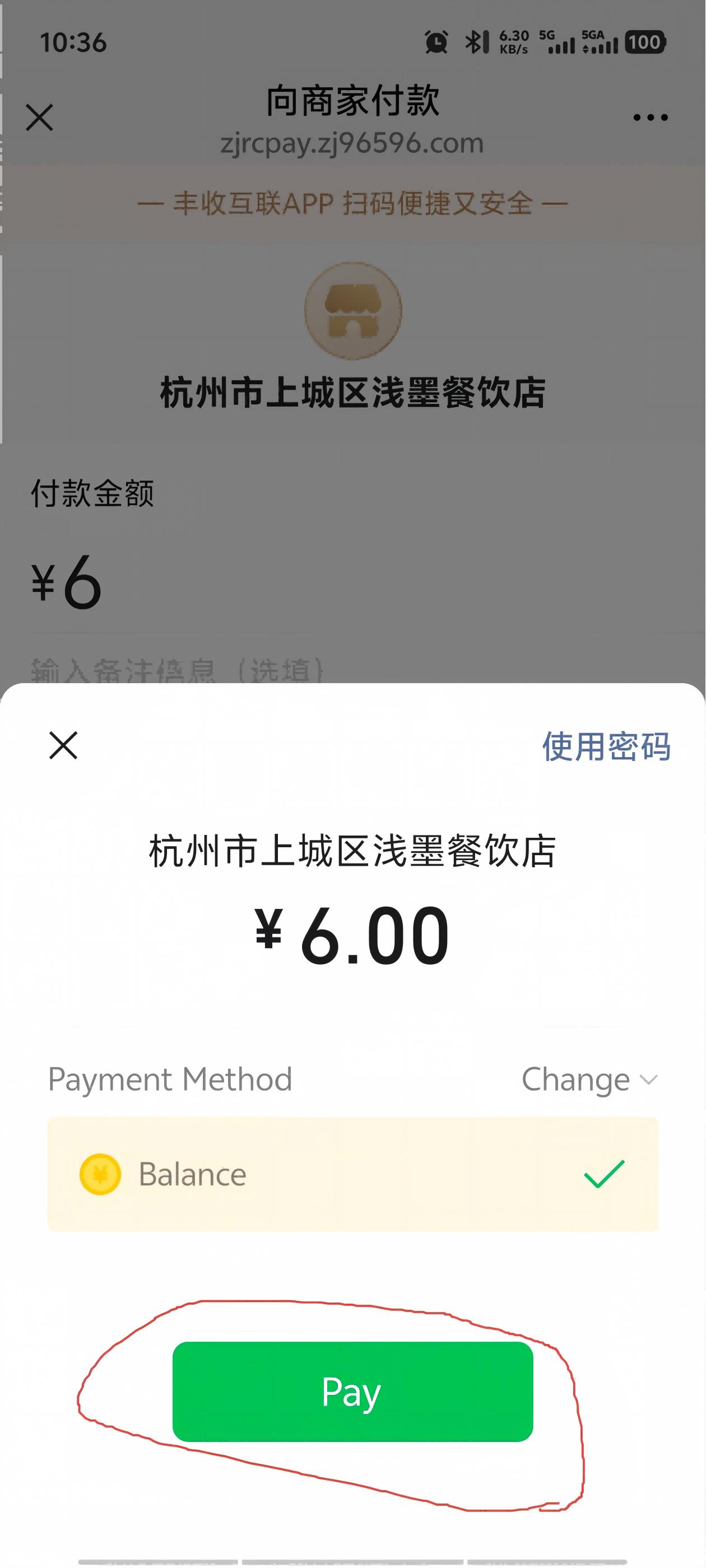
Confirm with your fingerprint, Face ID, or 6-digit payment PIN — and you're done. (Most Chinese users pay with fingerprint — it's the fastest option. If your phone supports it, set it up in WeChat's payment settings and skip typing the PIN every time.)
Method B: They Scan Your Code
This is the norm at convenience stores, supermarkets, and chain restaurants. The cashier scans your phone. You don't need to enter an amount — it's all handled on their side.
Open WeChat. On the home screen, tap the + button in the top-right corner. In the menu that slides up, tap Money — this jumps straight to your payment QR code.
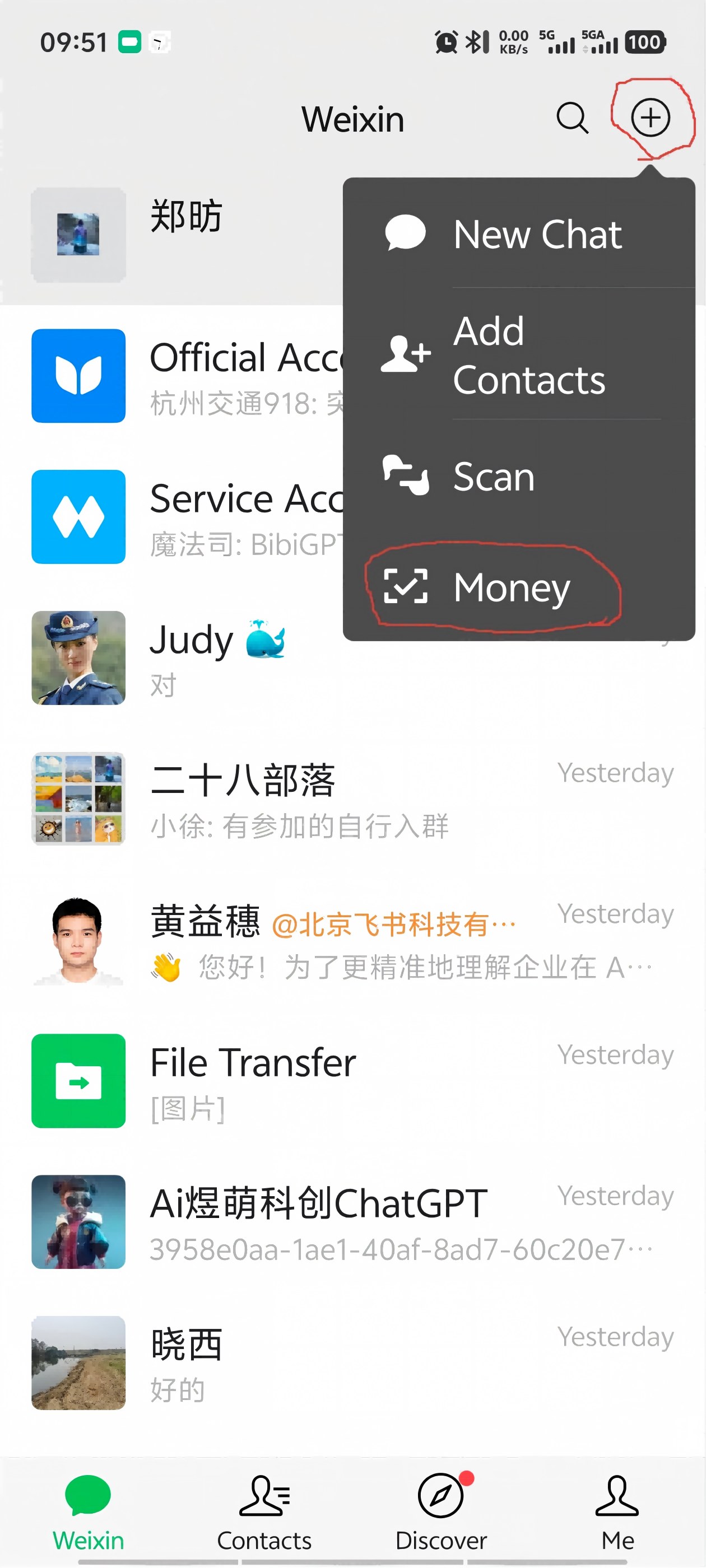
Below your QR code, you'll see Default Payment Method. The first time you use this, tap it and select the card you just linked — otherwise WeChat might try to charge a non-existent balance or a different card. Do this once and it remembers your choice. (Note: the QR code screen itself can't be screenshotted by WeChat's security policy, so we can't show it here — but the Money option in the menu above is what gets you there.)
The cashier will point a handheld scanner at your screen — just hold your phone steady until you hear the beep. Unlike Alipay, WeChat Pay is rarely used at self-checkout machines (those almost always default to Alipay). In practice, Method B with WeChat mostly happens at supermarket counters, convenience store registers, and chain restaurants where the staff scan your code with a gun-style reader.
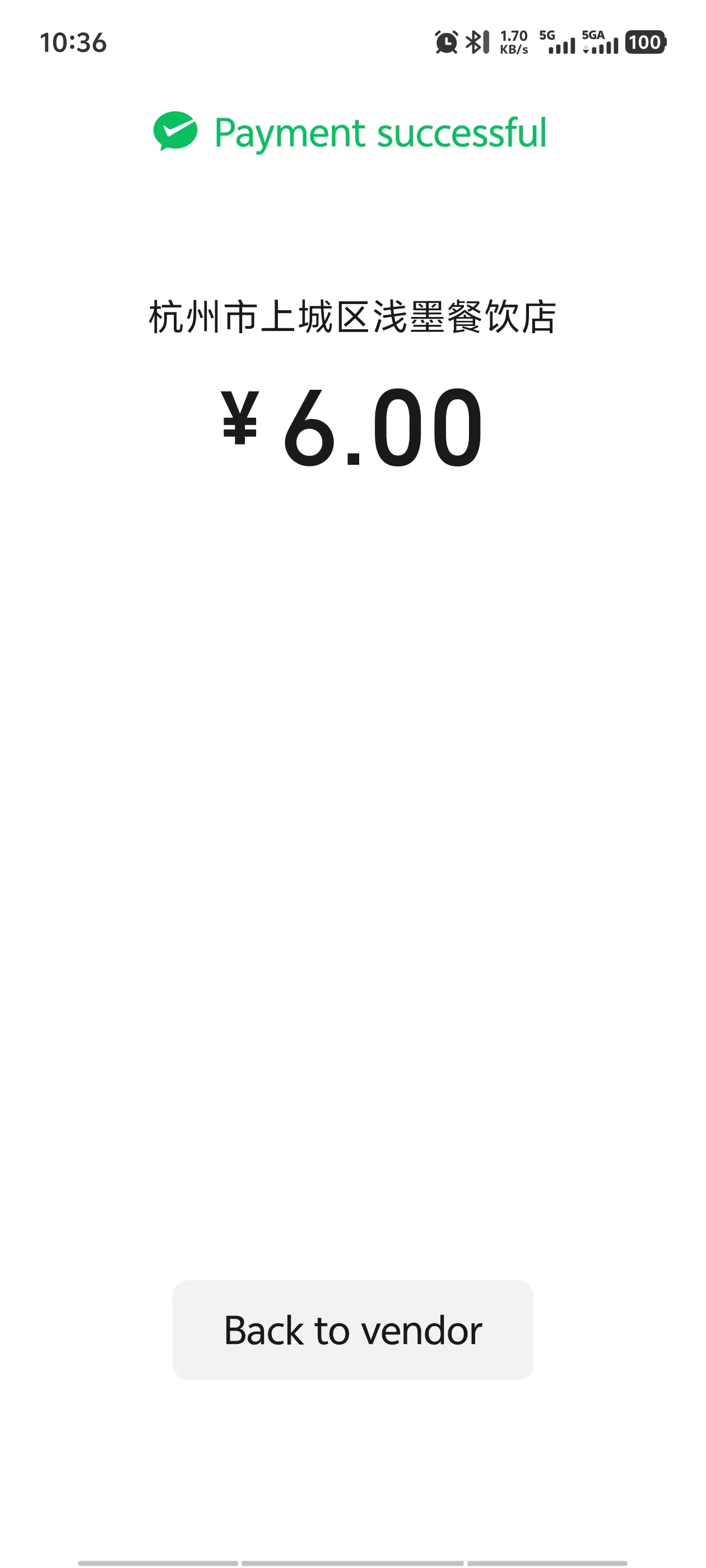
Whichever method you use, the payment success screen looks the same — a green checkmark with the amount and merchant name:
What Goes Wrong (and How to Fix It)
"Risk control — account temporarily restricted"
This is the WeChat special. It happened to me once after I tried to pay for three things in quick succession at a night market — ¥8 grilled squid, ¥12 bubble tea, ¥15 skewers, all within 10 minutes. WeChat's algorithm decided this looked like fraud and froze my payment function. I had to complete an additional face verification before it unlocked — took about 2 minutes, but it was annoying and a little embarrassing standing at the skewer stall while my payment refused to go through.
Fix: Follow the in-app prompts for additional verification. Usually a second face scan. If it keeps happening, use Alipay instead. Some accounts are just more prone to it than others, and there's no clear reason why.
"This card is not supported"
American Express is the usual culprit. WeChat Pay technically supports Amex, but in practice it's rejected more often than Visa and Mastercard, especially at smaller merchants and for auto-billing (bike rentals, power banks). If you have both Amex and Visa, use Visa as your WeChat Pay primary.
"SMS verification code never arrives"
This is common during setup when you're outside China. Try: switching from WiFi to mobile data, waiting 5 minutes and requesting again. Some carriers may silently block short-code SMS — try again or ask a friend in China to help with a domestic number for the verification step.
Pro Tips From Someone Who's Been Burned
- Keep at least two cards loaded. Same advice as Alipay, but doubly true for WeChat Pay because risk-control freezes can hit one card and not the other. I keep a Visa and a Mastercard in both apps — that's four total payment methods for a ¥15 noodle bowl, but the redundancy has saved me multiple times.
- Chinese name for WeChat: 微信 (wēixìn). WeChat Pay is 微信支付 (wēixìn zhīfù). Show these characters to anyone if you need help.
- Transaction fees: Fees can depend on card type, issuer, currency conversion, and the platform's current foreign-card rules. As a rough guide, expect ~0% on small purchases and ~3% on larger ones, but check the payment screen before confirming. The fee comes from your card issuer's cross-border processing, not from WeChat itself. Always pay in CNY when prompted — never accept conversion to your home currency at the point of sale, or you'll get a terrible exchange rate.
- Fee waivers: WeChat Pay occasionally offers limited-time fee waivers for new international users — check the in-app notice after setup. If you're planning a trip, setting up WeChat Pay just before departure can help you catch any active promotion.
- Don't abandon Alipay. WeChat Pay is a backup. Every foreigner I know in China uses Alipay 80% of the time and WeChat Pay for the remaining 20%. That ratio is correct. Don't try to make WeChat your primary — you'll just trigger more risk-control flags.
- WeChat Pay for metro/bus: Available in some cities, but Alipay's transit QR works in more places. For public transport, stick with Alipay or get a physical transit card.
Get the Free China Arrival Checklist
WeChat Pay is one piece of the puzzle. Get our free 5-day email guide covering Alipay setup, VPN, eSIM, essential apps, and your first 48 hours in China.
Get the Free Checklist